Packing the right electronics gear can make or break a trip. A forgotten charger or an incompatible plug can leave you without a phone, laptop, or camera when you need them most. This checklist covers the essential chargers, cables, batteries, and adapters you need, along with a pre-trip routine to back up your devices and download content before you go.
Phone and Charging
Your phone is likely your most-used travel device. Bring the charging cable that came with it, and consider a second one in a different length for convenience. A wall charger with multiple ports lets you charge your phone, earbuds, and other small devices from a single outlet. A compact a multi-port charger with USB-C and USB-A ports reduces the number of bricks you carry. Make sure the charger’s output is sufficient for your phone’s fast-charging standard (check your device’s specifications).
If you carry a tablet or e-reader, use the same multi-port charger to power those as well. For wireless charging pads, bring them only if you are sure you will have a stable surface and enough power outlets.
Cables
Cables are easy to forget and easy to lose. Pack at least one cable per device, plus a spare for the most common type (USB-C or Lightning, depending on your devices). Choose braided cables for extra durability; they resist tangling and wear better in a bag. Label each cable with a small tag or piece of tape so you know which belongs to which device.
Consider a short cable (6 inches to 1 foot) for use with a power bank, and a longer one (3 to 6 feet) for reaching outlets in airport seats or hotel rooms. A cable organizer or a tech pouch keeps everything tidy and prevents knots. Store cables in a dedicated compartment so you can grab what you need without unpacking everything.
Power Banks and Spare Batteries
A power bank keeps your phone and other small devices charged when you are away from an outlet. For air travel, there are important rules to follow. The Federal Aviation Administration (FAA) requires that spare lithium-ion batteries and power banks be carried only in carry-on baggage, never in checked luggage. This applies to all power banks and loose batteries. The FAA also limits capacity: lithium-ion batteries up to 100 watt-hours (Wh) are generally allowed in carry-on bags, and batteries from 100 to 160 Wh need airline approval. Check the FAA PackSafe lithium batteries page for current guidance, and confirm with your airline before you travel. For more detail on power bank rules, see our guide on bringing a power bank on a plane.
Choose a power bank with enough capacity to charge your phone at least once or twice. A 10,000 mAh power bank is a common size that fits easily in a bag. If you need to charge a laptop, look for a power bank that supports USB-C Power Delivery (PD) and has a high enough wattage rating for your laptop model. Always check the manufacturer’s instructions for charging and storage.
Store your power bank in an accessible pocket of your carry-on so you can reach it if needed. Some airlines restrict using or recharging power banks on board, so check your airline’s current policy. Keep spare batteries in their original packaging or in a protective case to prevent short circuits.
Plug Adapters
If you travel internationally, you will likely need a plug adapter to fit the local outlet shape. Adapters do not convert voltage; they only change the physical plug. Most modern phone and laptop chargers are dual-voltage (rated 100–240V), so they work worldwide with just an adapter. Older devices or high-power appliances (like hair dryers) may require a voltage converter. For a full explanation, see our article on travel adapter vs. voltage converter.
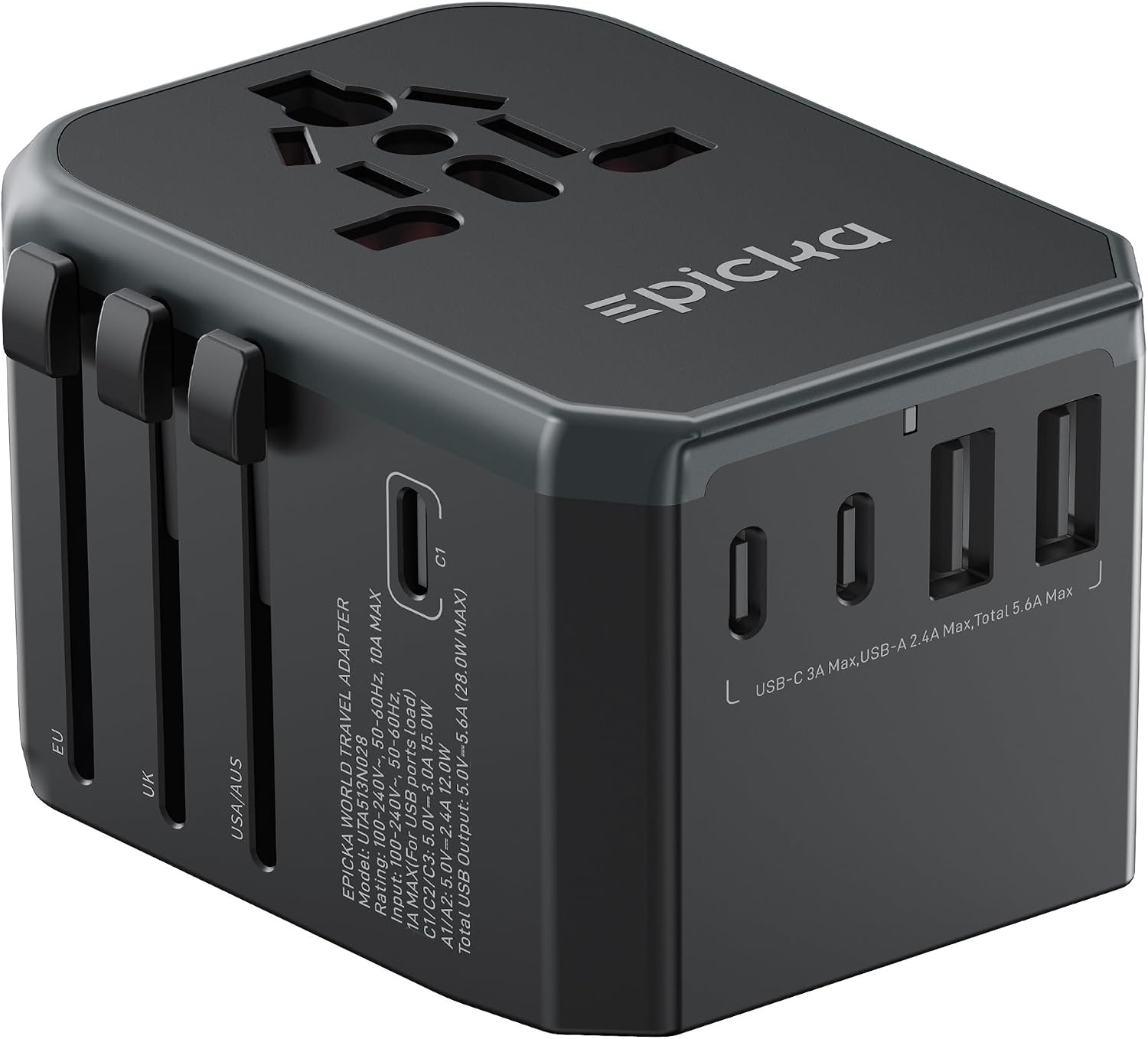
A universal travel adapter with multiple plug types (Type A for North America, Type C for Europe, Type G for the UK, etc.) is a versatile choice. Some also include USB ports, but be aware that the USB output may be limited. For high-power devices like laptops, use the adapter’s AC outlet and your own charger. Always check the voltage and wattage ratings on your device before plugging it in.
| Region | Common Plug Type | Voltage (typical) |
|---|---|---|
| North America | Type A / B | 120 V |
| Europe (most countries) | Type C / F | 220–240 V |
| United Kingdom | Type G | 230 V |
| Australia / New Zealand | Type I | 230 V |
| Asia (varies) | Types A, C, G, I | 100–240 V |
Note: Voltage ranges are typical. Check your device’s input rating (usually printed on the charger) to confirm it is compatible. If it says “100–240V,” you only need a plug adapter.
Headphones and Entertainment
Noise-canceling headphones or earbuds are a travel essential for flights, trains, and noisy hotels. Wired headphones can be a reliable backup if your wireless pair runs out of battery. If you use wireless earbuds, bring the charging case and a cable to recharge it. For long flights, consider a headphone splitter if you travel with a companion.
An e-reader or tablet is great for offline reading and watching movies. Download books, shows, and movies before you leave so you do not rely on Wi-Fi or cellular data. The same goes for podcasts and music playlists. Many streaming services allow offline downloads for a limited time; check the app settings and download while you have a good internet connection.
If you bring a camera, pack its battery charger and extra memory cards. Charge all batteries fully before you depart, and store them in a protective case. For travel with a laptop, see the next section.
Laptop and Work Gear
If you need to work on the road, a laptop is a must. Pack the power adapter and, if your laptop uses a separate power brick, consider a smaller third-party charger that supports USB-C Power Delivery (if your laptop is compatible). A portable mouse, a USB hub, and an extra cable for connecting to monitors or projectors can be useful. For business travelers, see our business travel checklist for a more detailed packing list.
Keep your laptop in a padded sleeve or compartment of your carry-on. If you carry a tablet as well, you can use it as a secondary screen. Remember to back up important files before you travel (see the next section).
Before You Leave: Backups and Downloads
Before you zip your bag, take a few minutes to prepare your devices for the trip. This routine can save you from losing data or being stranded without essential information.
- Back up your phone and laptop. Use cloud services or an external drive to save photos, contacts, and documents. If your device is lost or stolen, a recent backup means you can restore your data quickly. The U.S. State Department recommends making copies of your passport, visa, and itinerary; store them securely online or with a trusted contact. See the State Department traveler’s checklist for more tips.
- Download offline maps and entertainment. For navigation, use apps that allow offline map downloads. Download movies, shows, books, and music for offline playback. This is especially important if you will be in areas with limited or expensive internet.
- Update apps and software. Install any pending updates for your operating system, apps, and antivirus software. This reduces the chance of security issues and ensures compatibility with travel tools.
- Charge everything. Fully charge your phone, laptop, power bank, headphones, and any other battery-powered devices the night before you leave. This gives you maximum battery life when you arrive at the airport.
- Check TSA rules for electronics. In standard Transportation Security Administration (TSA) lanes, you are usually asked to place electronics larger than a phone, such as a laptop, in a separate bin; some lanes with newer scanners or TSA PreCheck let you leave them in the bag. Follow the instructions at your checkpoint. Review the TSA What Can I Bring page for the latest guidance. Also check if your airline has specific rules for carry-on electronics.
FAQ
Can I bring a power bank in my checked luggage?
No. The FAA requires that spare lithium-ion batteries and power banks be carried only in carry-on baggage. This is a safety regulation to reduce fire risk in the cargo hold. Always check with your airline, as some may have additional restrictions.
Do I need a voltage converter or just a plug adapter?
Most modern phone and laptop chargers are dual-voltage (rated 100–240V) and only need a plug adapter to change the physical shape. If your device is single-voltage (e.g., 120V only) or is a high-power appliance like a hair dryer, you may need a voltage converter. Check the label on your charger to see its input range.
How many cables should I pack for a trip?
Pack at least one cable per device, plus one spare for the most common type. If you have multiple devices that use the same cable (e.g., USB-C), bring two or three. A short cable for a power bank and a longer one for wall outlets covers most situations.
What should I do if I lose a charger while traveling?
Visit an electronics store or a local market. Universal chargers with multiple tips are widely available. For specialized chargers (e.g., for a camera), check with the manufacturer’s website for local retailers or order one to your hotel if you have enough time.
Packing the right electronics gear is about planning ahead. Use this checklist to gather your chargers, cables, power bank, and adapters, and complete the pre-trip backup routine. With everything in order, you can focus on your trip instead of hunting for an outlet or a missing cable.