 By Emily Parker
Updated November 2026
The best computer travel accessories protect your laptop, keep it powered, and make it usable in cramped seats, hotel rooms, and coffee shops. This guide walks you through how to build a compact kit, what each item does, and how to pack it so nothing gets left behind at security. By the end, you will have a short list you can adapt to any trip length.
Start With a Packing Audit
Before you buy anything, list what you actually use on the road. Most people carry a laptop, a phone, and maybe a tablet, then add accessories they never open. Write down the devices you will bring, how many hours of battery you expect to need each day, and whether you will be working or mostly streaming. That list tells you which categories matter.
Shopping for one? See our guide: 3 Best Travel Photography Accessories for Better Trip Photos (2026).
Questions to Answer First
- How many devices need power, and how many outlets will you realistically have?
- Will you work on a tray table, a lap, or a hotel desk?
- Are you flying with the laptop in a carry-on, or checking a bag?
- Do you need to connect to external monitors, projectors, or card readers?
- What country will you visit, and do you need a plug adapter?
Core Categories Every Kit Needs
Most useful travel setups cover five areas: protection, power, connectivity, ergonomics, and organization. You do not need one item in every subcategory, but you should be able to answer for each one.
Protection
A padded laptop sleeve or hard-shell case protects against drops and pressure in a bag. Look for a sleeve that fits your exact screen size, measured diagonally. Many manufacturers list a size range such as 13 to 14 inches, so check your model’s dimensions rather than guessing. A sleeve with a thin fleece lining helps prevent scratches on the lid.
Power
Pack a compact GaN wall charger that supports USB-C Power Delivery. Multi-port chargers let you charge a laptop, phone, and earbuds from one brick. Check the wattage rating on your laptop’s power adapter and make sure your charger meets or exceeds it for the laptop port. A portable power bank with at least 20,000 mAh is useful for long days, but confirm that it is rated for airline carry-on use, since most airlines require power banks to stay in the cabin, and many cap capacity at 100 Wh without special approval.
Connectivity
Hotel desks and airport seats rarely have the ports you need. A small USB-C hub with HDMI, at least one USB-A port, and an SD card slot covers most situations. Choose one with pass-through charging so you can keep the laptop powered while using the hub. A short, sturdy USB-C cable and a spare cable of the same type are worth packing, since cables fail more often than people expect.
Ergonomics
A lightweight laptop stand lifts the screen to eye level and reduces neck strain during long sessions. Folding aluminum stands pack flat and are common in travel bags. Pair one with a compact wireless or wired keyboard and mouse if you plan to work for more than an hour at a time. A wrist rest adds comfort on hard surfaces.
Organization
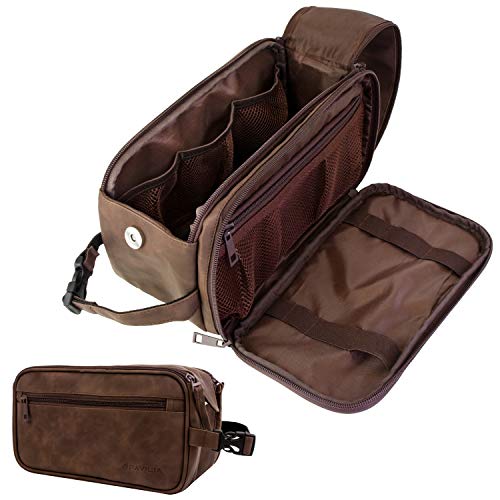
A dedicated tech pouch keeps chargers, cables, and adapters from tangling. Use a zippered pouch with mesh pockets so you can see everything at a glance. Keep it in an outer pocket of your carry-on so it is easy to pull out at security.
Build Your Kit Step by Step
- List your devices and their charger wattages. Note the laptop adapter rating and every device that charges over USB.
- Choose protection first. Pick a sleeve or case sized to your laptop, measured with the lid closed.
- Consolidate power. Select one multi-port charger instead of several single-port bricks.
- Add a hub and cables. Confirm the hub has the ports you need for your most common connections.
- Check plug types. If you are traveling abroad, confirm which adapter your destination uses and whether your charger has a universal input range.
- Pick ergonomic gear only if you will work. Skip the stand and keyboard for leisure trips.
- Pack and test. Lay everything out, zip it into your pouch, and confirm it fits in your bag with room to spare.
Checklist: What to Pack
- Laptop sleeve or hard case
- Laptop charger and spare charging cable
- Multi-port USB-C wall charger
- Power bank (rated for carry-on)
- USB-C hub with HDMI and card reader
- Plug adapter for destination country
- Tech pouch
- Laptop stand (if working on trips)
- Compact mouse and keyboard (if working)
- Privacy screen filter (if working in public)
Comparing Accessory Types
The table below summarizes what each category does and when it matters most. Use it to decide where to spend your packing space.
| Accessory | Main job | Best for |
|---|---|---|
| Laptop sleeve or case | Physical protection | Every trip |
| Multi-port charger | Powering several devices | Trips with many gadgets |
| Power bank | Charging away from outlets | Long travel days |
| USB-C hub | Adding ports to a laptop | Presentations, hotel desks |
| Laptop stand | Screen height and posture | Remote work |
| Privacy filter | Limiting screen visibility | Cafes, airports |
Common Mistakes
- Buying a sleeve by brand name instead of size. Measure your laptop and match the sleeve to the screen diagonal and depth.
- Packing a power bank in checked luggage. Most airlines prohibit lithium batteries in checked bags, so keep it in the cabin.
- Forgetting the adapter for your destination. A charger without the right plug is useless. Check the destination’s plug type before you leave.
- Ignoring wattage. A low-wattage charger can charge a laptop very slowly or not at all during use.
- Bringing too many cables. One spare of each type you use is usually enough.
Tips for a Lighter, Safer Kit
- Keep all power accessories in one pouch so you can check them in seconds.
- Label cables with a colored tag if you carry several of the same type.
- Back up files to cloud storage or an encrypted drive before you leave.
- Use a cable organizer or wrap cables with velcro ties to prevent damage.
- Test your full kit at home for a day to see whether you forgot anything.
Recommended gear
A multi-port USB-C wall charger lets you power a laptop, phone, and earbuds from one outlet, which saves space in a carry-on. Look for a model with Power Delivery support that matches your laptop’s wattage. View on Amazon
A USB-C hub with HDMI and an SD card slot adds the ports most hotel desks and conference rooms lack. Choose one with pass-through charging so your laptop stays powered while connected. View on Amazon
A lightweight aluminum laptop stand folds flat and raises the screen to a more comfortable height during long work sessions. It is a practical choice for anyone who works on the road for more than an hour a day. View on Amazon
FAQ
Do I need a laptop sleeve if my bag has padding?
Padding in a backpack helps, but a dedicated sleeve keeps the laptop from shifting and protects it when the bag is squeezed in an overhead bin. A sleeve is inexpensive insurance against scratches and pressure damage. Worth reading next: 5 Best Travel Clothes and Accessories for Doll Play and Gifting (2026).
Can I bring a power bank on a plane?
Most airlines allow power banks only in carry-on bags, not checked luggage. Check your airline’s current policy and the watt-hour rating on the battery, since larger batteries may need approval.
What wattage charger do I need for a laptop?
Use the wattage printed on your laptop’s original adapter as a baseline. A charger with equal or higher Power Delivery output will charge the laptop properly, though it will not push more power than the laptop can use.
Do I need a plug adapter or a voltage converter?
Most modern laptop chargers accept a wide voltage range, so you usually need only a plug adapter. Check the label on your charger for the input range, and confirm the destination’s voltage before you buy anything extra.
Is a USB-C hub necessary if my laptop has enough ports?
Not always. A hub is useful when you need to connect a projector, external monitor, or card reader that your laptop cannot handle directly. If you rarely use those connections, a small cable may be enough.
Should I bring a privacy screen filter?
A privacy filter helps if you often work in airports, cafes, or trains where others can see your screen. It reduces viewing angles but can dim the display slightly, so test it before relying on it.
How many cables should I pack?
Pack one spare for each cable type you use daily. Keeping a backup prevents a single failure from ending your work, and it adds very little weight.
Where should I store my tech kit in a carry-on?
Keep the pouch in an easy-access pocket so you can remove it at security checkpoints if required. Store the laptop in its sleeve in the main compartment or a dedicated laptop pocket.
Conclusion
A good computer travel kit covers protection, power, connectivity, and comfort without filling your bag. Start with a packing audit, choose one multi-port charger and a sized sleeve, and add a hub or stand only when your work requires it. Test the full setup before your trip so you know it works when you need it.
Related reading
- Travel and Leisure Best Travel Accessories: 9 Essentials Worth Packing (2026)
- Men's Travel Accessories Bag: 5 Best Picks Compared (2026)
- Best Travel Tech Accessories: 9 Essentials for Every Trip (2026)
Ready to choose one?
About Emily Parker
Emily Parker is part of our editorial team and reviews and edits our travel essentials & packing lists guides, checking product details against manufacturer specifications and owner feedback.