 By Emily Parker
Updated November 2026
The most useful iPad accessories for travel are a protective case, a compact charger with a USB-C cable, a portable battery, a stand, a keyboard or stylus if you write or sketch, and a sleeve for the bag. Everything else is optional. Pack based on what you will actually do on the trip, not on what looks convenient at home.
Why the right accessories matter on the road
An iPad spends more time in transit than at a desk. It gets tossed into overhead bins, slid under seats and carried through security checkpoints, where you may need to pull it out. A case with raised edges protects the corners and screen, and a sleeve keeps it from scratching against keys, pens and other gear.
Shopping for one? See our guide: 3 Best Travel Photography Accessories for Better Trip Photos (2026).
Battery life is the other problem. Airport outlets are scarce, and gate areas fill up fast. Carrying a charger and a portable battery means you are not stuck waiting for a seat near a wall plug. Check your iPad model’s charging spec in Apple’s documentation so you pick a power source that delivers enough wattage.
Factors that decide what you need
Three questions narrow the list quickly:
- What will you do on the iPad? Reading and streaming need little more than a case and charger. Writing, email and spreadsheets are much easier with a keyboard case or Bluetooth keyboard.
- How long is the trip? For a single day, one charger may be enough. For a multi-day trip with long transit, add a portable battery sized to cover the iPad’s charge several times over.
- Where will you use it? A stand helps on tray tables and hotel desks. Note that airlines and seat-back mounts vary, so check airline rules before relying on one.
What to pack, step by step
- Choose a protective case with raised edges and a screen cover, and test that the cover closes securely before you leave.
- Pack one USB-C charger and a matching cable. Keep the cable a few feet longer than you think you need, since airport outlets can be far from seats.
- Add a portable battery. Check the airline’s current rules on power banks before you fly, since they are often restricted to carry-on bags.
- If you type, bring a keyboard or a keyboard case and confirm it pairs with your iPad before the trip.
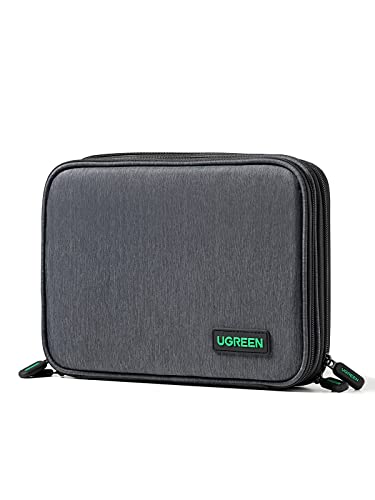
- Store everything in one zippered pouch so cables do not tangle and small items do not get lost.
- Download offline content, such as shows, books and maps, before you board. Airplane Wi-Fi is often slow or paid.
For a broader look at packing gear, see Best iPad Travel Accessories: 7 Essentials for Every Trip (2026). If you are shopping for a bag first, Travel Bag for iPad and Accessories: 6 Things to Check Before You Buy covers sizing and padding. Gear for phone photography is covered in iPhone Camera Accessories for Travel: 9 Picks for Better Trip Photos, and Travel Case for Tech Accessories: How to Choose and Pack One (2026) explains how to organize a tech kit.
What we’d use
A slim folio-style case with a screen cover suits most travelers who want protection without bulk. View on Amazon
A compact USB-C wall charger with a second port lets you charge the iPad and a phone at once. View on Amazon
FAQ
Do I need a portable battery for a flight?
Not always, but it helps on long flights or when outlets are scarce. Check the airline’s rules on power banks before you pack one, since carry-on rules are common and checked-bag restrictions can be stricter.
Is a keyboard case better than a standalone keyboard?
A keyboard case is one less item to carry and keeps the iPad protected. A standalone Bluetooth keyboard usually gives a more comfortable typing position and can be packed separately.
Can I use a seat-back mount on a plane?
Some travelers use them, but airlines set their own rules about mounting devices. Confirm with your airline before the flight and avoid blocking the seat or tray table in ways that conflict with crew instructions.
Related reading
- Women's Travel Accessories Luxury: 9 Essentials Worth Packing (2026)
- Wandering Moon Travel Accessories: What They Are and How to Use Them
Ready to choose one?
About Emily Parker
Emily Parker is part of our editorial team and reviews and edits our travel essentials & packing lists guides, checking product details against manufacturer specifications and owner feedback.