 By Caleb Morgan
Updated November 2026
The right accessories for business travel keep you connected, comfortable and on schedule without overloading your bag. This guide walks through how to build a work-trip kit from the ground up: what to carry on, how to organize it, how to match gear to trip length, and which mistakes to avoid. By the end, you will have a checklist you can reuse for every trip.
Start With Your Trip Profile
Before you buy or pack anything, define the trip. A two-night conference in one city calls for a different kit than a week of client visits across three time zones. Note the number of nights, whether you are flying or driving, what kind of meetings you have, and whether you will have reliable hotel Wi-Fi and a desk. Those four answers determine most of your accessory list.
Shopping for one? See our guide: 3 Best Travel Photography Accessories for Better Trip Photos (2026).
Questions to Answer
- How many nights are you away, and how many outfits do you need?
- Will you present, sign documents or handle sensitive files?
- Do you need a laptop-ready workspace in the room?
- Are you crossing time zones or converting currency and power standards?
- Will you have time to shop for forgotten items?
Build the Carry-On Core
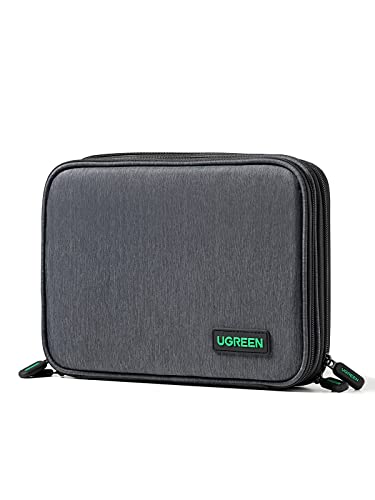
Your carry-on should hold everything you cannot replace quickly: charging gear, documents, medications and your work devices. Many business travelers pack the core kit into a dedicated pouch so it moves between bags without repacking. Keep the pouch in the same pocket of the same bag every trip so you never wonder whether something made it.
Power and Charging
Pack a compact power bank rated for air travel. Most airlines follow the FAA rule that lithium batteries of 100 watt-hours or less may be carried in the cabin without special approval, and 101 to 160 watt-hours requires airline approval. Check your airline’s current policy before you fly, since rules can vary. Add a multiport USB-C charger with at least two ports, a short cable for each device, and a travel power adapter if you leave the country. Label cables with a small piece of tape or a color tag so you can identify them at a glance in a hotel room.
Documents and Security
Keep a physical copy of your itinerary, hotel confirmation and any meeting materials you need offline. A slim document organizer or a zippered folder protects paperwork from bending. For sensitive files, consider an encrypted USB drive and a privacy screen for your laptop, which limits what people beside you can read on a plane or in a café.
Organize the Workspace Kit
A hotel desk is often too small, too low or too poorly lit for real work. A small set of accessories makes the room function like an office. Think in terms of what you would have on your desk at home, minus the bulk.
- Laptop stand: a foldable aluminum stand lifts the screen to eye level and reduces neck strain during long sessions.
- Compact keyboard or mouse: a Bluetooth mouse with a small receiver saves space and works on most surfaces.
- Portable monitor or tablet: useful if you spend hours comparing spreadsheets or documents side by side.
- Notebook and pens: handwritten notes survive dead batteries and bad connections.
- Cable organizer: a zippered pouch keeps chargers from tangling in the bottom of your bag.
Plan for Comfort on Long Days
Business travel days are long and often include early flights, late dinners and standing in conference halls. Comfort accessories reduce fatigue and help you stay sharp for the final meeting.
Sleep and Noise
Pack a sleep mask and foam earplugs. Hotel rooms near elevators, highways or busy streets are common, and a quiet night is easier to get with the right gear. Some travelers also carry a small white-noise app or a compact fan if they are sensitive to sound.
Sitting and Walking
A lumbar support cushion helps on airplane seats and rental cars. Compression socks can reduce leg swelling on flights longer than about four hours, though people with circulation conditions should check with a doctor first. Comfortable shoes that work with both suits and walking should be part of the plan, and breaking them in before the trip prevents blisters.
Match Accessories to Trip Length
Scale your kit to the trip. A one-night trip needs fewer items, and a longer trip needs backup gear and laundry solutions.
| Trip Length | Focus Accessories | Packing Note |
|---|---|---|
| 1 to 2 nights | Charger, adapter, document folder, toiletry kit | Carry on only if possible |
| 3 to 5 nights | Add laptop stand, garment bag, travel steamer | Pack outfits as coordinated sets |
| 6 nights or more | Add laundry detergent sheets, extra cables, backup power bank | Plan one laundry stop if possible |
Recommended gear
These product types appear on many business-travel packing lists. Look for models that match your devices and trip style.
- Anker 737 Power Bank: a high-capacity power bank that suits laptops and phones on long days away from outlets. View on Amazon
- Nomad Slim Wallet with RFID: a thin wallet for cards and cash that keeps the pocket profile small in a suit. View on Amazon
- Peak Design Packing Cubes: modular organizers that keep shirts and accessories separated inside a rolling bag. View on Amazon
- Bose QuietComfort Noise Cancelling Headphones: over-ear headphones that reduce airplane engine noise during calls and rest periods. View on Amazon
Common Mistakes
- Packing every cable you own. Bring one charger per device and one spare.
- Forgetting to check hotel power standards before an international trip.
- Storing your power bank in checked luggage, where airlines typically prohibit it.
- Assuming hotel Wi-Fi will handle video calls. Test your connection before important meetings.
- Buying new gear the week of departure. Test accessories at home first.
- Skipping a backup plan for documents. Keep digital copies in cloud storage and a printed set.
Tips for a Reusable Kit
- Keep a standing packing list and check items off after each trip to replace what runs low.
- Store the core kit in a labeled pouch and restock it immediately after you return.
- Choose accessories in one color family so they coordinate and are easy to spot in a bag.
- Review your list each season to add or remove items based on how you actually traveled.
If you are building a broader setup, Best Travel Accessories for Business: 9 Essentials for Work Trips covers more product types, and Work Travel Essentials Woman: 10 Items to Pack for Any Business Trip offers a parallel checklist for women who travel for work. For phone-focused gear, see Travel Accessories for iPhone: 9 Essentials for Every Trip. If you fly often, Travel Accessories for Flying: 9 Essentials for a Smoother Trip adds in-flight comfort items. For organizing your bag itself, Travel Luggage and Accessories: A Step-by-Step Packing Guide (2026) explains how to pack by category.
FAQ
What are the most important accessories for business travel?
A reliable charger set, a compact power bank, a document organizer and a toiletry kit cover most needs. Add a laptop stand or noise-reducing headphones if you work long hours in your room or on flights.
Can I carry a power bank on a plane?
In the United States, the FAA allows lithium batteries up to 100 watt-hours in carry-on bags, and batteries from 101 to 160 watt-hours need airline approval. Power banks must stay in the cabin, not checked luggage. Confirm your airline’s current rules before flying.
Do I need a travel adapter for domestic business trips?
No. A travel adapter is only needed when you leave a country whose plug or voltage differs from your home. Domestic trips within the US use the same outlets.
How many charging cables should I pack?
Pack one cable per device plus one spare of the most-used type. Labeling cables helps you spot the right one quickly in a hotel room.
Should I bring a laptop stand on every trip?
Only if you plan to work at the hotel desk for extended periods. For a single-day trip or a short stay with mostly meetings, a stand adds bulk you may not need.
What is a good way to keep work documents secure while traveling?
Use an encrypted USB drive or cloud storage with two-factor authentication for digital files. Keep printed copies in a zippered folder and avoid leaving them unattended in shared spaces.
How do I protect my sleep on business trips?
Pack a sleep mask and earplugs, and request a room away from elevators or ice machines when you book. If sleep problems persist, consult a healthcare professional rather than relying only on travel accessories.
Is compression clothing necessary for long flights?
It is not required for everyone, but many travelers find compression socks comfortable on long flights. People with circulation issues, diabetes or a history of blood clots should talk with a doctor before using them.
Conclusion
A focused set of accessories for business travel makes trips smoother, from the first security line to the final meeting. Start with your trip profile, build a carry-on core for power and documents, add workspace and comfort gear, and scale the kit to trip length. Keep one standing list, refine it after each trip, and your next departure will take far less thought.
Ready to choose one?
About Caleb Morgan
Caleb Morgan is part of our editorial team and reviews and edits our travel essentials & packing lists guides, checking product details against manufacturer specifications and owner feedback.